

Roadmap
Where Blendable is going. The keystones in the order they're coming, the smaller updates between them, and the ideas that aren't plans yet.
Blendable grows by keystones: big releases that each add a whole kind of camera. Each one is a gem set in the plugin's emblem, with a colour of its own that it keeps wherever it appears. Between them come smaller updates, each released when it's ready. A keystone is known by its name; the version number just counts releases.
Blendable FX is the odd one out: a keystone that's a plugin of its own, for the effects over every cut. Its stone has no colour, only its own negative, glowing and split at the edges.
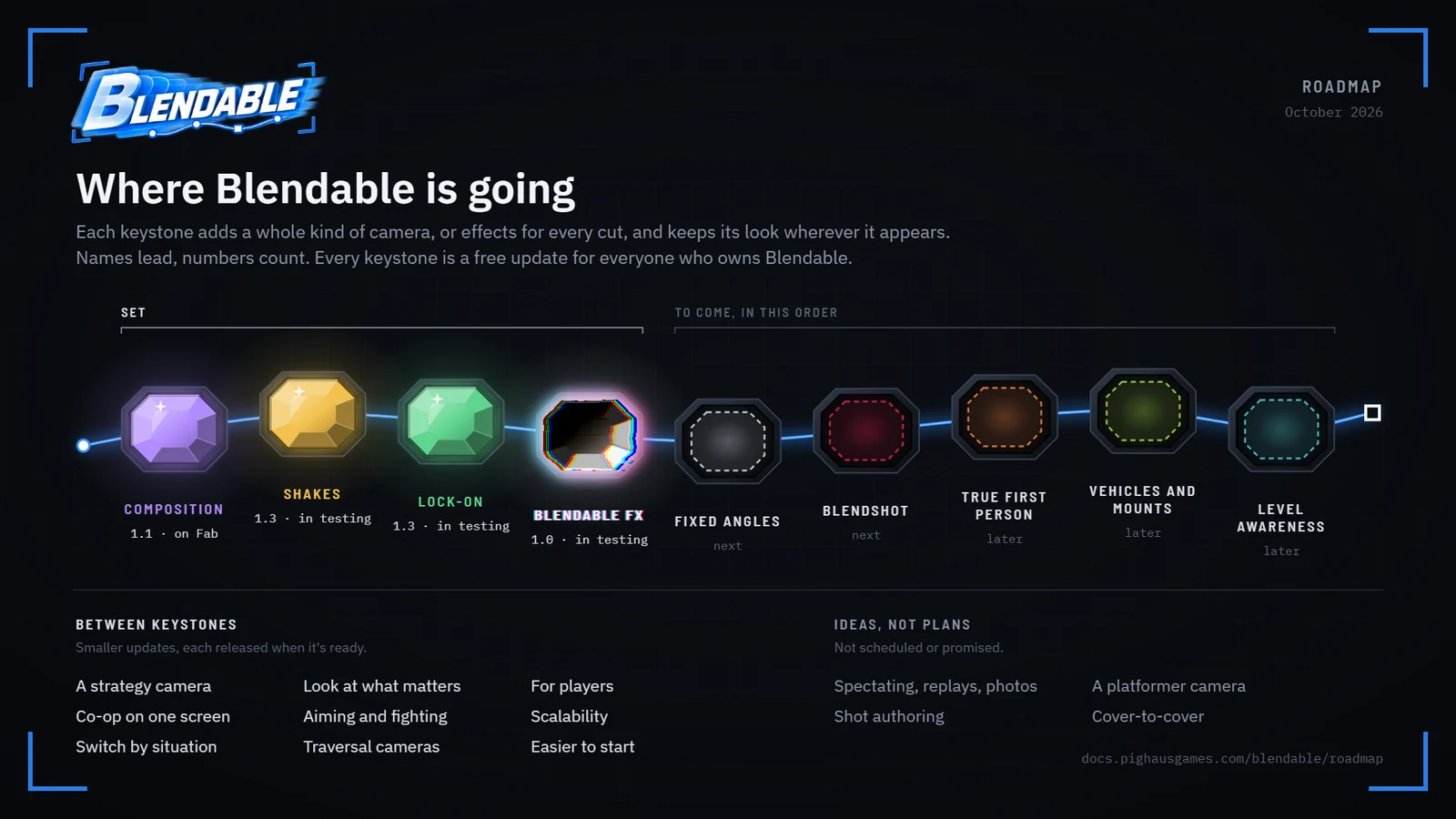
Every keystone arrives as an update to the one plugin, free to everyone who already owns it. And four things never change: nothing pops, every behaviour is a switch and every number tunable, every setting says in plain words what it does to the picture, and nothing you've made breaks when you update.
This looks forward from what has shipped. Every fix and every known issue is in the changelog. If something here matters to you and isn't moving, say so and it'll move: priorities come from what people actually hit.
Released
1.3 Two keystones in one release, Shakes and Lock-on, built and being tested. The shake pages and the lock-on pages describe it as it stands.
Next
Later
Smaller updates Between the keystones, each released on its own when it's ready, in no fixed order.
1.0.0
Live on Fab from 17 September 2026. The follow camera and its Rigs, the claim ladder and Presets, collision, composition, Directors, shakes, comfort, the Sequencer tracks, Asset Compare, and a packaged demo. What each piece does and what it fixed along the way are in the changelog.
Composition, 1.1
Live on Fab from 7 October 2026, after two weeks in review. Where the character sits on screen became the language every shot is written in: a spot in percent, the drift around it, and shifts that move it as you play. Follow lag, a framing preview on every Rig with a slider per driver, Live Tune for editing the camera while the game runs, and clearer wording on every setting in the plugin. The changelog has the whole of it.
Shakes built from layers
A shake becomes a stack of layers in one asset: a sharp kick, a burst of rumble, a slow sway, as many as you like. Movement, tilt and field of view are tuned separately in every layer, and every part can vary a little each time, so nothing repeats exactly.
An operator who follows the action
Handheld motion that answers what the camera is doing: steady at rest, heavier at a sprint, a jolt when you set off or stop dead, an overshoot on a whip pan, a beat late like a real person, and still out of breath for a moment after you stop running. It lives on the Rig, so it changes with the shot.
Shakes that keep the frame
Handheld layers can move the world while the character stays where composition put them, so the shot feels alive without the framing swimming.
Footfalls and landings as data
Footsteps, landings, jumps and any event you name can trigger layers, and montages get a Camera Event notify. The landing thump and the footstep rumble stop being code and become assets you can copy and tune.
One mixer for everything
Groups for handheld, body, impacts, world and cinematic, each with its own limits, with big hits quietening the handheld beneath them. Players get separate comfort options for movement, tilt and lens, and a Keep Horizon Level switch.
Tools for feel
A live graph on every shake with a slider for everything it reads, a button that plays it on the camera without starting the game, the mixer in the camera stack readout, and a library of thirty shakes to start from. Blendable shakes also play through Unreal's own camera shake system.
Every style has its own shakes
Survival Horror gets a simple walking bob and barely a breath, Cinematic Action the whole camera operator, Action RPG sits halfway between them, and a new Hack and Slash preset pulls well back for fighting crowds with next to no shake at all.
Shake Volumes
A box in the level that loops a shake while you're inside, fires one as you cross in or out, makes some kinds of shake stronger or weaker, or swaps the camera operator.
Top-down, isometric and side-on cameras
Three new presets that hold their own angle, so the mouse and the look stick leave them alone and up on the stick is still up on the screen. A Rotate Camera node turns them, smoothly from a stick or 45 or 90 degrees a press, and the side-on camera leaves the space ahead of you and swings over when you turn round.
Lock-On Presets
One asset on the lock-on component sets the whole shot, and it's swapped and blended from a Blueprint node, a volume, the target itself, or automatically as the fight changes, each with a priority you set. Switch the automatic side off and every shot is yours to author.
Two subjects, two spots on screen
Put yourself in one place in the frame and the enemy in another, and the camera works out the distance, height and angle to hold you both there, opening out to a group shot when more enemies join in.
Shots that answer the fight
Arm length, field of view, pitch and yaw can each follow distance, height difference, the angle off the line between you, the target's size or how many enemies are near, with a curve for each. Plus rules for which side of the line the camera keeps, what the stick does while you're locked, and how a giant gets framed.
The lens as a cinematographer would use it
Dolly or zoom to hold the framing, a dolly zoom as the lock lands, focus on the target, on you, or on both, racks on a switch or a gameplay event, and Blueprint nodes to move the focus moment to moment.
Locking on with some weight to it
Looks for locking on, holding and letting go, each with its own timing and curve: grading, vignette, your own materials, letterbox bars, a highlight on the target. Hooks on every moment to play a sound, spawn an effect or run your own code, and markers on every target.
Lock-On Volumes
A box in the level that swaps or adjusts the lock-on shot by area, or locks on for you as you walk in.
Lock-on tools
A preview in the preset's panel with stand-in subjects, so you can tune without playing, and the effects played over it; the lock-on in a readout on screen and in Live Tune, which follows the preset framing the lock.
Presets named by use
Duel, Arena, Giant, Ranged and Finisher beside the genre's own lock, a brawl and a standoff, each lens and distance worked out from the shot it's for.
Panels that read broad to fine
Every asset's panel opens on what matters most, each feature one line with its switch and a few words on what it's doing, and any asset copies and pastes as one block of text: to another of its kind, or in from the values pages here.
Content with names you can read
Every style gets a folder holding its Preset, its Rigs, its shakes and its Lock-On Preset, and the prefixes become words: Preset, Rig, Shake, PointOfInterest, LockOn. Anything already pointing at an old name still finds it.
Fixes, and a heads-up
The three known issues in 1.1 are fixed, with nothing left to tick: the camera puts effects on screen itself. Recentring, switching lock-on target and moving between points of interest all get smoother. Footstep audio, foley and stealth loudness leave Blendable in 1.3; footstep events still fire, so your own audio can hang off them.
Blendable FX
Screen effects for any Unreal project, begun for Fixed Angles' cuts and grown into a plugin of its own. One effect asset plays as a transition over any change of shot, an impact that strikes once, or an overlay held on screen: fifty-eight looks from irises and film burns to anime impact frames that smear and explode, each tuned to the last setting, with distortion, aberration, motion blur and masks over any of them. It works without Blendable, and Blendable's fixed cameras, presets and hooks pick its effects up. Built, and being tested; its docs are up, every effect playing.
Fixed Angles
Fixed cameras placed in the level that take over by area, the way classic survival horror frames a room: each a held shot, crossing to the next as you walk between them, with controls that stay sensible across the cut so the stick doesn't turn you round. Each can hold still, turn to follow or ride a line along the ceiling, with its own look, shake, effects and presets, a camera move can carry the shot from one to the next along a path of your own, and a point of interest that placed the camera turns into one with a click. Built, and being tested: its docs are the Fixed Angles version of these, under Version.
Blendshot
Finishers and kill cams: a takedown, a finishing move or an execution, or the flight of an arrow, a bullet, a knife or a spell, as shots keyed in Level Sequences that take over from wherever the gameplay camera is, slow the world for the moment that matters and hand back without a cut. A finisher starts itself as the takedown animation starts, in time with the blows; a kill cam rides the projectile from the shooter to the one it kills, over any distance. Brought forward from the end of this list, as Camera Sequences, and given its own name. It ships with four takedown shots, two endings for a fight's last foe and twelve kill cam shots. Built, and being tested: its docs are in the next update's version of these, every kill cam on film.
True First Person
A first-person camera that knows it has a body: motion from the skeleton, leaning, aiming down sights, and your own arms and legs in view. First person is a view mode of the follow camera today; this makes it a camera in its own right, still blending to and from every other. Begun in 1.4: a Rig can sit on a first-person mesh of its own, place the eyes in the view's axes, and draw arms and held items with Unreal's first-person rendering.
Vehicles and Mounts
Cars and bikes, flight, boats and water, horses and ridden creatures, each with the camera it wants. There are no real vehicles to test on here, so each is tuned from reference on a stand-in that moves like the thing, and says so until a real one proves it. Not started.
Level Awareness
Zones and rails a designer places to steer the camera. A rail is a spline whose points carry Rigs, crossed by where you stand rather than by a timer, which is the spline camera once planned for 1.4. Fading whatever stands between the camera and the character has already arrived, as see-through in the next update. Not started.
A strategy camera
Edge and key panning, zoom levels, orbiting, following a unit, bounds, and jumping to a place on the map.
Co-op on one screen
Framing several players at once, pulling back to fit, and splitting the screen when they drift apart.
Switch by situation
Rigs and presets chosen by what's happening, through an interface, Blueprint nodes and C++, so a game can switch from its own code whenever it likes.
Look at what matters
The view leaning towards threats, objectives, things to use or sounds, by weight and within the player's comfort settings.
Aiming and fighting
Aiming tuned per weapon, aim assist, and framing for melee without a lock.
Traversal cameras
Climbing and ledges, swimming and diving, gliding, vaults, slides and wall-runs. There's no traversal system here to test with, so these are tuned by eye on stand-ins and labelled that way until a real system proves them.
For players
Comfort profiles chosen in one press, Motion Sensitive, Cinematic or Competitive, and playing with one stick.
Scalability
Low, Medium and High, trading probes and smoothing for cost.
Easier to start
A setup questionnaire that recommends a preset by genre and feel; fitting Blendable to Unreal's Third Person template, the Game Animation Sample, Lyra or any pawn in one click; a few broad sliders on a Rig that move many settings at once; and tuning the framing, the arm and the lens in the viewport while you play.
released Composition Shakes Lock-on Blendable FX Fixed Angles Blendshot True First Person Vehicles and Mounts Level Awareness milestone not built yet· the higher on the line, the surer I am of it
Ideas, not plans#
- Spectating, replays and a photo mode. A camera that follows someone else's game, plays one back, or stops the world for a picture.
- Shot authoring in the editor. Composing a shot by moving the camera in the viewport, rather than by numbers.
- A platformer camera. One that turns round corners with the level and knows how high a jump will go.
- Cover-to-cover. A camera that moves with the player into cover, along it and out again.
Not planned#
Saying no is part of a roadmap.
- A replacement for Gameplay Cameras. Blendable is a complete camera system of its own and needs nothing else. If Epic's system suits you, use it.
- Mobile and VR. Blendable is made for PC, with a mouse and keyboard or a pad, and for consoles through a pad.